Play click sound while immediately advancing slide

Hi,
I want to play a short UI click sound when a button is clicked and advance the slide immediately, without waiting for the sound to finish.

I tried unchecking “Blocking” in the Play Audio settings, but when testing in SCORM 1.2 output, there is still a slight lag/delay before the slide advances.

How can I make the audio play in the background while the slide moves forward instantly, even in SCORM output?
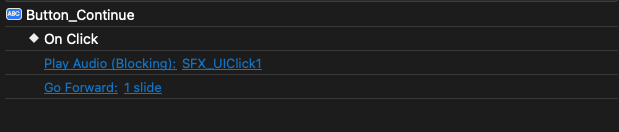
Thanks!

Hi Alice,

Could you please send your project along with its external data folder (named PROJECT_FILE_files) to support@atomisystems.com so we can take a look?

Regards,

Regarding your message about the audio delay, it could be because your server/LMS is underperforming or your network is slow

In case the audio is cut off in the first few seconds, please check the workaround I shared in this thread: Audio delay on xAPI

To fix the delay specifically for buttons and feedback:

  1. Add the audio to the slide and set it to Initially Hidden.
  2. Replace the Play Audio action with a Show Object action.

I have updated the project with these changes and sent it to your messages. Please check it!

Best regards,
Hoa

1 Like