Fun With the Scroll Wheel

I thought it might be fun to try some state changes using the scroll wheel.

In this sample, you can hover over the shape and then use the scroll wheel to cycle through five different shapes. Reversing the direction of scroll will reverse the order in which the shapes are displayed.

See how I make it work in the attached sample project.
What other ideas might you have for this sort of application?
Please share your thoughts in the replies below.

scrollStates.approj (284 KB)

5 Likes

Really interesting Greg, I am always amazed at what you can do… :hugs: :smiling_face_with_three_hearts:

1 Like

Excellent, Greg,

do you happen to know whether it’s possible to scroll tables?

I would like to use a table of, say, 100 rows with only 20 visible at any given time and a scrollbar moving the rows up and down.

Any ideas are much appreciated,

Rolf

@Rolf- Without digging deep on this one - my quick response is that since you would be limited to a table with 50 rows - I might achieve a similar effect by creating a table with 20 rows and populating your data and making a screenshot of it.

Create another table of 20 rows and continue to populate the data and make screenshots.

You could then cycle through the screenshots in the same way as with the shapes. I suggest this as the table itself cannot have multiple states

Thanks, Greg!

I was hoping there was a way to scroll through a table like you can scroll through a text box…

Take care, Rolf

Hi @Rolf,

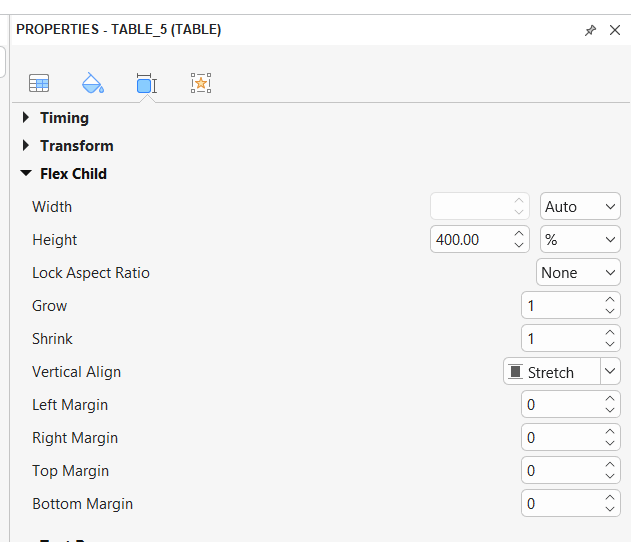
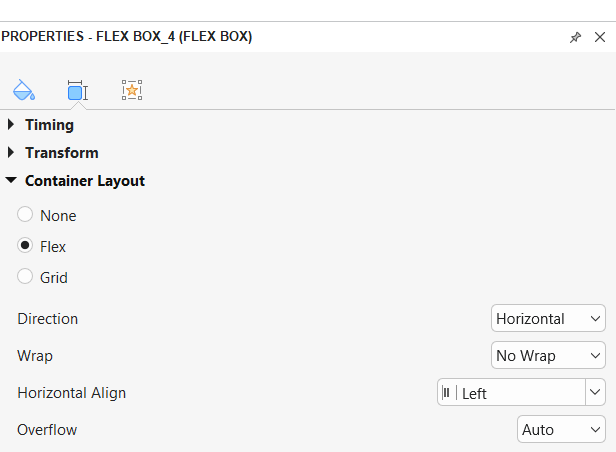
If you want the table to scroll the same way a website does, you can place it inside a flexbox container.

First, set a fixed height for the table.

Then, set the flexbox’s Overflow property to Auto.

This will allow the table content to scroll smoothly within the container.

scroll table.approj (1.2 MB)

Hope this helps!

If you want to create a project like Greg’s, you can capture each state as a screenshot, following his guidance :smiley:

1 Like

Thanks, Hang, excellent.

That’s exactly what I was looking for.

I assume there is no way to override the 50 rows limit, is there?

Best, Rolf

1 Like

Yes, Rolf, currently the maximum number of rows and columns for a table in ActivePresenter is 50 × 50. In your case, if you need to add 100 rows, you can use two tables :smiley:

Below are the detailed settings for the flexbox and container:

Set the width of each table to 100%, and set Wrap = Wrap in the Flex Container Layout.

scroll table.approj (1.6 MB)

Excellent, I thought the scrolling was a feature of the table, but, of course, it’s a feature of the flexbox …

Thanks, Rolf