Fill in Text Entry – Show only one correct value in Review Mode

Hello ActivePresenter Team,

I created a Fill in Text Entry question in ActivePresenter.
Example question: What is the capital of France?

Correct Values entered:

  • Paris
  • PARİS
  • Paris, France
  • The capital of France is Paris
  • paris, france
  • City of Paris

The issue: In Review Mode, ActivePresenter shows all correct values one below the other.

What I want: The system should accept all variations as correct answers, but in Review Mode, I only want to display one standard answer (e.g., “Paris”).

Is this possible?

Thanks!

Hi,

Please find the attached project for your reference.
fill_text_entry.approj (1.4 MB)
And here are the steps to create it:

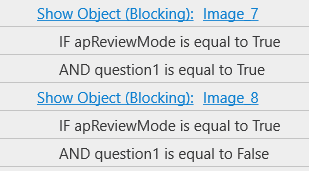
  1. Add a Shape response with Correct and Incorrect images → set to Hidden by default.

  2. Click on correct image => show Shape response

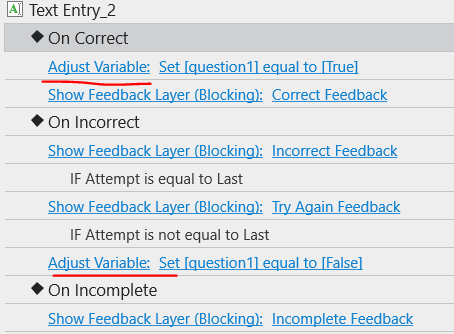
  3. Create a True/False variable for the question to determine whether the answer is correct (default value: FALSE).

  4. In the On Correct and On Incorrect events of the question: Add an Adjust Variable action: set to True or False.

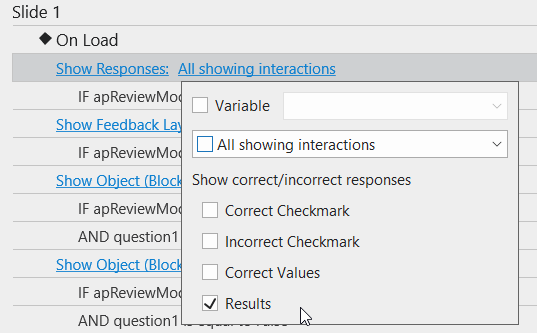
  5. In the On Load event of the slide:

Regards,

1 Like

Hello Hang,

First of all, thank you for sharing the sample project file. However, when I tried to open the fill_text_entry.approjfile, I encountered the following error:

Interprocess exception (boost: 7, native: 2): No such file or directory

This error first appeared when I attempted to open the project. Afterwards, when I tried to start ActivePresenter again, the same error kept showing up, and the program could no longer start normally.

Just wanted to let you know.

Thank you.

Hi Burhan,

Thanks for your quick response.

About the error you see: Interprocess exception (boost: 7, native: 2), you can perform the steps below to see if it addresses your issue:

  • Search for and remove the file named ActivePresenter 9.x.x (the suffix may vary based on the ActivePresenter version) located in the user folder.
  • Restart your computer and delete that file in case you cannot delete it for the first time.

Similar cases have been reported here: ActivePresenter not startin on macos. "Interprocess exception (boost: 7, native: 2)"

Or another way is, click the Launchpad in the Dock, open Activity Monitor, then close ActivePresenter and relaunch it.

Hope this helps!

1 Like

Hi Hang,

Thank you for your guidance. I followed the steps you suggested — locating and removing the ActivePresenter file in the user folder and restarting my computer — and I’m happy to report that the issue has been resolved. ActivePresenter now starts normally without showing the “Interprocess exception (boost: 7, native: 2)” error.
I really appreciate your support!

Best regards,

1 Like