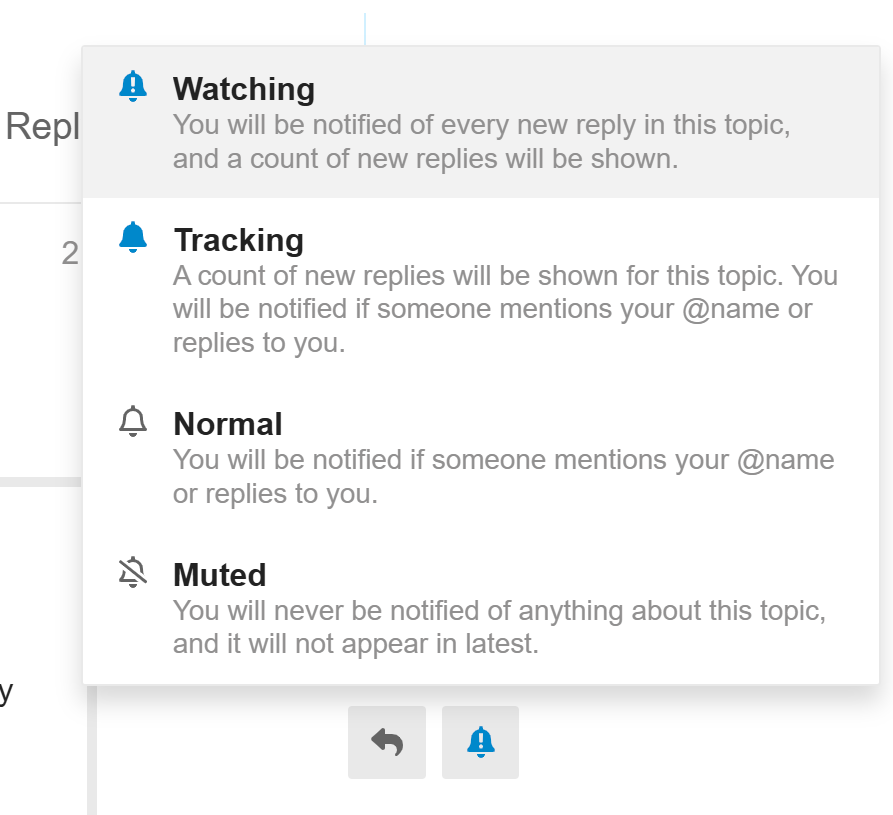
For those who don’t want to receive all the notification emails when there is a new post in a topic like this one, just click the bell icon at the bottom of the topic and switch the watching mode to Normal or Muted as in the screenshot below.
According to this comment, an essential feature would be the ability to manage slides by groups or scenes, as can be done in other software. This would allow for better organization when the project is large and has many slides, as well as the ability to review by previewing only certain scenes rather than having to preview the entire project. In this new version, I see an option to “add slide group,” but I am not clear on what function it performs or what its purpose is.
I have the same concern. If you purchased the pro license for version 9, is the new version included, or do you have to purchase the license for the new version?
If your licenses are still in the first year of maintenance then you can upgrade to AP10 free of charge. If the maintenance period has expired then you need to renew the maintenance for another year or choose to upgrade directly.
The maintenance cost is roughly 15% of the license cost each year, while the upgrade costs 40% of new license cost.
You can check for renewal or upgrade for your license at:
I couldn’t see any truly radical innovations in version 10.0.0. The only nice addition seems to be the re-encode option during export. My expectation was a fully modernized interface, along with more detailed control and customization of the existing tools. Finally, the application really needs thorough and in-depth testing. There are still many issues, especially on macOS.
I just updated and wanted to say thanks a ton for finally giving us a way to sort resources by name! Being able to search for them is a nice bonus too. This alone is worth upgrading to 10 if I don’t have to manually find the a resource among the 1400 resource audio/images in my project based solely on when I originally added each one to the project. Keep up the great work. You all do a great job of listening to your users. And we get that it sometimes takes time to get to everything.
ActivePresenter 10 is a remarkable step forward in e-learning and screen recording. The redesigned interface is cleaner and more intuitive, making content creation faster than ever. The new built-in AI tools, enhanced timeline performance, and improved HTML5 export options truly elevate the workflow. Features like advanced interactivity, smoother animations, and better responsive design support make this version a must-have upgrade. It’s clear that the developers have listened to user feedback and delivered a polished, professional tool.
i was working with Captivate too ….. tho older one…… and i didn´t like it. Not even because of the high price….. the handling was horrible…. Before i was working with Mediator from Matchware, which was good in progrramming advanced actions. Happy now with Active Presenter which is superfast on my slower Computer, has a much better interface than others and i come quickly to results