How do I get a youtube video to play automatically
Hi,
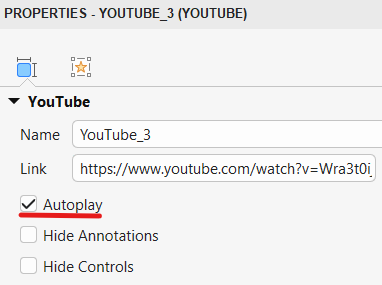
To make a YouTube video play automatically in ActivePresenter:
- Select the YouTube video on the slide.
- Open the Properties pane > Size & Properties > YouTube.
- Enable the Autoplay option.
Note: Due to autoplay policies in some browsers, the video may be muted or may not autoplay until the learner interacts with the page (for example, by clicking somewhere on it). To ensure more consistent behavior, you may consider adding a Start button on the first slide.
BR,
1 Like