I am experiencing an anomalous behavior in the latest version of ActivePresenter regarding the “Merge into Background” feature.
Steps to reproduce:
Insert an image onto a slide.
Right-click the image and select “Merge into Background” (or use the equivalent command).
Expected result:
The image should become a permanent, non-selectable part of the slide background, and its layer should disappear from the Timeline.
Actual result:
The image correctly disappears from the Timeline (so it can no longer be locked or managed as a separate object). However, on the canvas, the image remains selectable and movable. It can still be dragged around, which causes layout issues since there is no way to lock its position anymore from the timeline.
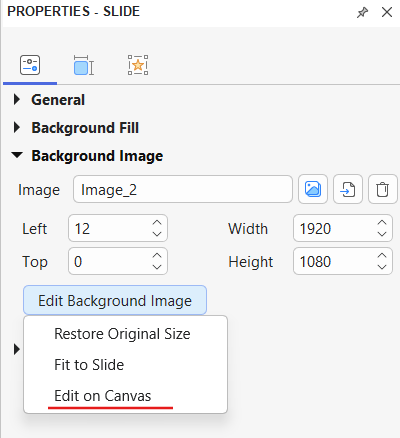
This behavior is actually part of a new improvement in ActivePresenter 10.6.0. After an image is merged into the slide background, it is removed from the Timeline as before, but the background image can now be edited directly on the Canvas.
This makes it much quicker and more convenient to adjust the background image when needed. You can reposition or resize it directly on the Canvas, or use the available tools in the Media Tools tab to edit the image.
If you do not want the background image to remain editable on the Canvas, you can turn off this editing mode:
Go to the Slide Properties pane > Background Image section.
I have another question regarding images in ActivePresenter 10.6.
Did something change regarding how normal images behave when inserted onto the canvas? I can no longer resize or distort them like I used to. Whenever I try to stretch or distort an image, it behaves as if “Lock aspect ratio” is permanently turned on—it only scales up and down proportionally without allowing any distortion.
This behavior is related to the Media Fit feature, which has been available since ActivePresenter 10.
If the image is using Contain, it keeps its original aspect ratio when the object is resized. To stretch or distort the image freely, please select the image, then go to: Media Tools tab on the ribbon > Media Fit > Stretch.
For more information, please refer to:
You can also check the Media Tools tab section in the ActivePresenter User Manual, around page 424.