Hi. How can I make the TOC responsive so that it scales its size on small screens? In the player settings, there is only the option to adjust the width, but this value is fixed and does not change for different devices. On small screens, it takes up too much space. I know you can activate the button to show or hide the TOC, but I need it to always be visible or at least work like a hamburger menu, which I think is easier for users to identify.
Hi Joan,
Thank you for your question.
At the moment, the TOC width doesn’t automatically scale on smaller screens. We’ll try to improve it to be more small-screen friendly in the future.
For now, a possible workaround is to add some custom code in the project’s On Load event to adjust the TOC behavior (File > Project > Properties > Interactivity tab of the Properties pane):
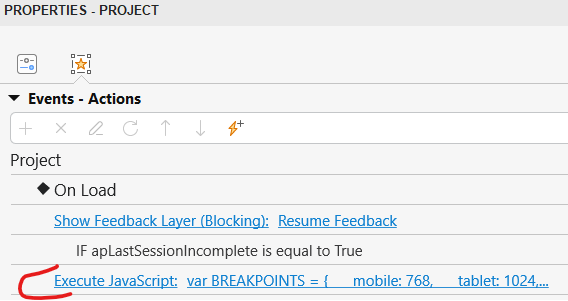
var BREAKPOINTS = {
mobile: 768,
tablet: 1024,
desktop: 1280
};
var TOC_WIDTHS = {
mobile: 200,
tablet: 250,
desktop: 350
};
var currentWidth = 0;

function getTOCWidth() {
var screenWidth = window.innerWidth;

if (screenWidth < BREAKPOINTS.mobile) {
    return TOC_WIDTHS.mobile;
} else if (screenWidth < BREAKPOINTS.tablet) {
    return TOC_WIDTHS.tablet;
} else {
    return TOC_WIDTHS.desktop;
}

}

function applyResponsiveTOC() {
var sidebar = prez.ui.sidebar()[0];
if (!sidebar) {
return;
}

var newWidth = getTOCWidth();

if (newWidth !== currentWidth) {
    sidebar.style.width = newWidth + 'px';
    currentWidth = newWidth;
    prez.layout();
}

}

applyResponsiveTOC();
window.addEventListener(‘resize’, applyResponsiveTOC);
Here is where you can adjust the TOC size as you want:
var TOC_WIDTHS = {
mobile: 200,
tablet: 250,
desktop: 350
};
Hope this helps!
Your question made me think of the custom TOC that I created for my post here
This has a hamburger button at the bottom left.
You should be able to resize the window and see the project scale - and also the TOC.
Is this sort of what you had in mind?
2 Likes
Hi Greg,
I reviewed your project and I think this menu option could work for what I had in mind. Thank you very much for responding and sharing the information.
Hi Hang,
Thank you very much for responding. I tried the code you suggested, but the following message appears: “Error parsing the presentation. Check the browser console for more information.”
I will try to check in the browser to see if I can identify this error.
Hi Hang,
I was able to identify that the issue was related to the quotation marks inwindow.addEventListener(‘resize’, applyResponsiveTOC); After replacing them with standard JavaScript quotes, it worked correctly.Thank you very much.
2 Likes
oooh - Smart Quotes… those are brutal
Good catch!
Hi Greg,
I’ve been testing the code you shared in your material to create the hamburger menu, but I haven’t been able to get it to work properly. I don’t know if you can give me any recommendations on how to do it. I’m working with this code, both to show and hide, and adding the direction in which I want the animation to take place:
prez.object(“menu”).hide(
AP.EffectType.PEEK_OUT,1000,{
direction: AP.EffectDirection.RIGHT
});
Thank you
1 Like
That is a separate thing altogether. The project offered some animation ideas with JavaScript but that is not how I worked out the custom TOC.
Here is how I did the Custom TOC
// checks the value of the help variable
// if test passes (TOC is shut) - open it
// change variable value to one (open)
if (prez.variable("help")==0) {
$(prez.object("tocGroup").node).animate({left: "0px"},1000);
prez.variable("help",1);
}

// if the test above fails (TOC is open)
// shut it
// change variable back to zero (shut)
else {
$(prez.object("tocGroup").node).animate({left: "-310px"},1000);
prez.variable("help",0);
}
I made all the text shapes with appropriate links tied to them and Grouped the entire TOC and named the group “tocGroup”
Adjust the left value appropriately based on the width of your TOC
The 1000 value is the length of time in milliseconds that the animation happens. Adjust to your liking.
Hope this helps.
1 Like
Thank you very much for sharing this. I’m going to try it out in my project.
1 Like