How do I limit the slides to review when I click on the Review button? I only want it to go over the Quiz item slides and not the entire presentation.
Hi,
You can limit the review to only Quiz slides by using the built-in variable apReviewMode. When the learner clicks Review button, apReviewMode is automatically set to true.
Here are the steps:
- Select the slide you want to skip.
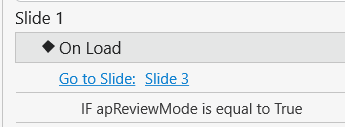
- Go to the Properties pane > Interactivity > Events - Actions.
- Add Go to Slide or Go Forward action to the On Load event of the slide.
- Click Add Condition > If apReviewMode is equal to value true.
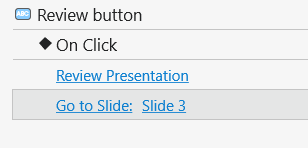
Additionally, if the slides you want to review are consecutive, you can simply change the action of the Review button on the Report slide to Go to Slide and set it to jump directly to the first quiz slide.
Regards,