Just a quick question as I look to save a bit of time: I have an audio file that is present on every slide of a rather long project. Whether it plays or not depends user input, but it is there on every slide. I have realized a small error in the audio, so I have made a new one. Is there a way to replace the audio on all slides without doing it manually for each one? I tried by adding a file to the resources with the same name, hoping it would signal that they’d all be replaced but it it was wishful thinking only .
I saw something similar on this post from a few years ago, and wondered if anything has changed or if there are any other options or ideas.
I’m afraid that you may have to do it manually now to achieve what you wish, dear.
But we’ll take note of your request and let our development team discuss it further.
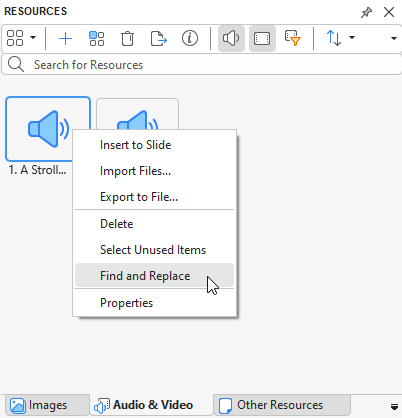
We’re glad to let you guys know that you can find and replace resources in multiple slides consistently and quickly in ActivePresenter 10Resources pane now.
Just right-click the resource > select Find and Replace.
In the first case, you can select exact slides to replace the resources.
In the second case, you can insert a new file with the same name with the previous one then the app will allow you to replace all resources with the same name.
I hope this helps things run more smoothly on your end.
BR,
Thuy
Helloooo @PhuongThuy_Le - thanks a lot for the update. This is so useful, honestly. Is this only in AP10, though, or will there be an update for AP9 as well?
We generally don’t add new features to older versions. However, we still provide bug fixes and essential maintenance for ActivePresenter 9 for a while longer to ensure stability for existing users.
If you’d like to explore the new capabilities, you’re welcome to try out ActivePresenter 10. It offers several enhancements that make creating and editing projects much more efficient.
 .
.