Hi all,
Let me clarify for you some information:
When opening an ActivePresenter 9 project’s output, a Resume Feedback will appear to ask if you want to resume the presentation from the last slide viewed. This is the default events-actions settings of the project (ActivePresenter button > Project > Properties pane > Interactivity tab > Events - Actions).
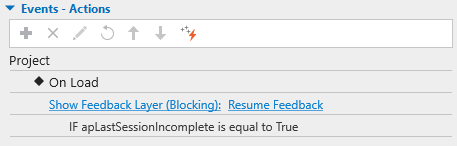
- If you want the presentation to resume without showing the feedback layer, just delete the Show Feedback Layer: Resume Feedback action.
- If you want the presentation to start without showing the feedback layer, you can replace the default action with the Restart Presentation action with the same condition.
When opening an ActivePresenter 8 project’s output, the presentation will automatically resume since the project doesn’t include any actions in the project’s event, by default.
So, to achieve your wish, you can add the corresponding action to the Events - Actions section of the project.
All the best,
Thuy