Problem: Looking for way to have user click on button to go to specific place on timeline
ActivePresenter version: Version 10.1.1 - 64-bit. (Released: 2026.01.30)
OS: Mac Latest
Notes: Hi, I am looking at an option so when a user clicks on a button, it will take them to a specific time on the timeline (on the same slide). I wondered if it could be done with labels but cannot see this option (although I see it is on Saolo Animate).
So I’m looking for 1 of to options
On click > Go to 6:00:00 on timeline or
On click > Go to label titled ‘x” on timeline
If I’m missing something obvious I apologise. I have looked through the manual and the forums here so not sure this is even possible!
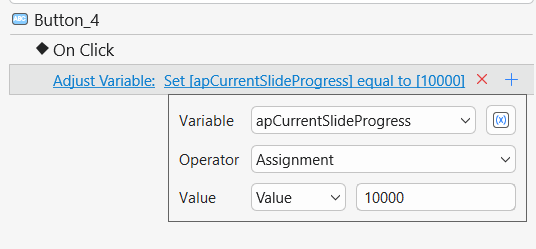
To jump to a specific time on the timeline, the most straightforward way is to use the built-in system variable apCurrentSlideProgress. This variable stores the current playback position of the slide in milliseconds.
You can set it up by adding an Adjust Variable action to the On Click event of the object/button, as shown below.