object disappear after executing "motion path" animation

Problem:

ActivePresenter version: 10

OS: windows 11

Notes: rectangle object disappear after executing “motion path” animation, this started to happen after updates installation. even I canged “Lock origin” in the effect options from locked to unlocked and viceversa.

Hi,

Could you please let me know your ActivePresenter version, and send us a sample project as well as a short video illustrating the issue so that we can check?
Regards,
Hoa

1 Like

Hi Hoanp,

I got message saying “New users can’t upload attachment”,

I have the project & extracted video as well, however I can’t upload.

kindly advice please.

Br,

Ahmed Ibrahim.

Hi Ahmed,

You can send the project files and the video to our support email at support@atomisystems.com.

If these files are too large to attach, please upload them to a cloud storage service such as Google Drive and share the download link with us.

Regards

1 Like

Thanks a lot, I sent the Email.

Hi Ahmed,

Thanks for sending the project.

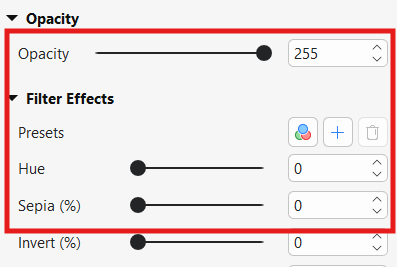
After checking it, we found that the issue is related to the object’s visual properties. Please set the values as shown in the attached image.

Then preview the motion path again.

Regards,
Hoa

1 Like

Thanks a lot, it worked. :partying_face:

1 Like