Problem: I am trying to build a project with multiple sections, each with their own quiz. We want to make it so that each section has to be completed before moving onto the sext section. The problem here is that it calculates all quiz questions for the entire project when determining a pass/fail result for a section quiz. Additionally, we need to be able to have the individual quizzes rewritten without clearing all previous quizzes.
I’m thinking that I could build a customized section quiz results page that only allows you to proceed to the next slide if you have xx number of correct answers thus far in the project, but so far, I haven’t figured out how to do this.
Here is a breakdown of requirements:
8 sections, each with a quiz
Each quiz is between 4-6 questions
A score of 100% is required to pass each quiz
Each quiz needs the option to be rewritten without affecting previous quiz results
ActivePresenter version: 10.1.1
OS: Windows 11
Notes: I am pretty new to Active Presenter (and LMS creation in general) so specific details are helpful!
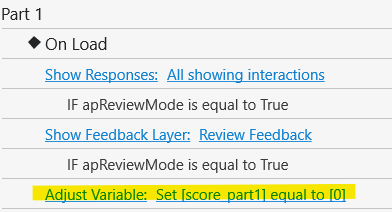
If learners only need to retake the quiz questions without revisiting the content slides, you can place this action on the On Load event of the first question slide in that section instead.
For the question slides:
Set Attempts to Infinite for the questions.
You can do this via View > Object Settings, select a question, and set Attempts to Infinite. This setting will be applied to all newly added questions afterward.
On the On Load event of each question slide, add a Clear User Input action.
Configure the question actions as shown in the attached screenshots.
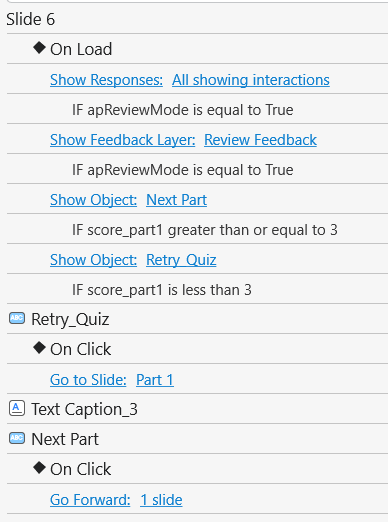
On each section result slide:
Set the Next and Retry Quiz buttons to be initially hidden.
Add the actions shown in the attached screenshots to the slide’s On Load event and the buttons’ On Click events.