Problem:
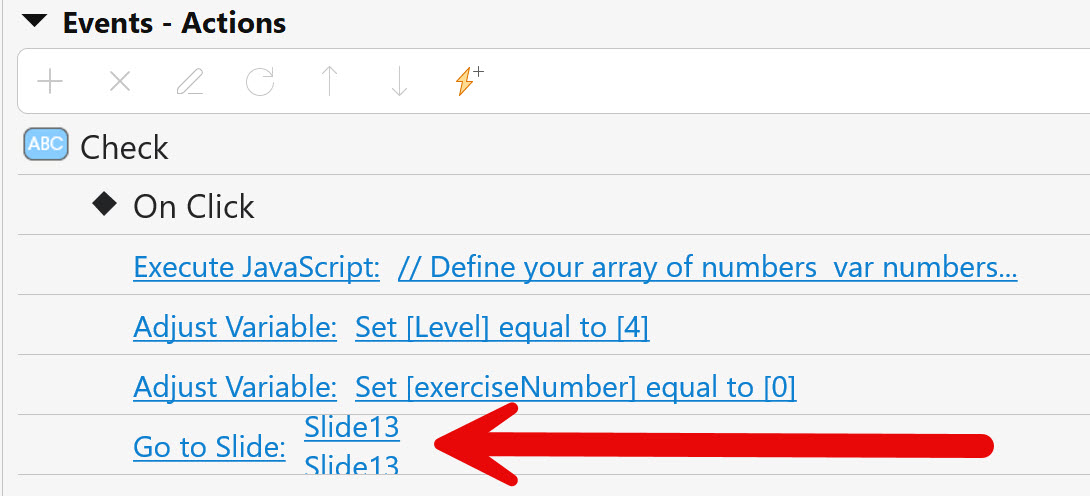
ActivePresenter version: 10.1.1
OS: Windows 11
Notes:
This happens when you rename a slide and give an ‘enter’. It creates a new line.
Problem:
ActivePresenter version: 10.1.1
OS: Windows 11
Notes:
This happens when you rename a slide and give an ‘enter’. It creates a new line.
Hi,
Thank you for your report.
Regarding the issue, it seems that the slide name contains a line break caused by pressing the Enter key while renaming. This makes the name appear on multiple lines.
To resolve it, please try editing the slide name again and remove the extra line break (press Backspace/Delete to remove the Enter). The slide name should then display correctly on a single line.
Please let us know if the issue still persists after that.
That’s correct!
I think it’s wonderful that AP allows the user to name slides, but it’s not very logical that the name field allows for multiple lines.
As a trainer of ActivePresenter, I now need to teach users to be watch out and not use ‘enter’ when renaming slides.
I think it would be much better if AP just wouldn’t allow for multiple lines in the name field.
Thank you very much for the quick respons!
Hi Koen,
Thank you for your valuable feedback.
We understand your point, and it makes sense to restrict slide names to a single line for better usability. We will forward your suggestion to our development team for consideration.
We appreciate you taking the time to share this with us!