Is there a keyboard shortcut to split a video file on the timeline?

Problem: On the video timeline in Active Presenter 9, is there a keyboard shortcut to split a video file into segments? For example, Camtasia does this just by typing “S” when you move the timeline cursor to the time stamp of the video where you want to split it. I’m not using Camtasia anymore so that is why I am here. If not, just know that this feature made editing films go much faster than dragging the mouse icon to the split icon on the timeline.

ActivePresenter version: 9

OS: Windows 11 Home

Notes:
Hi,

Thanks for your question.
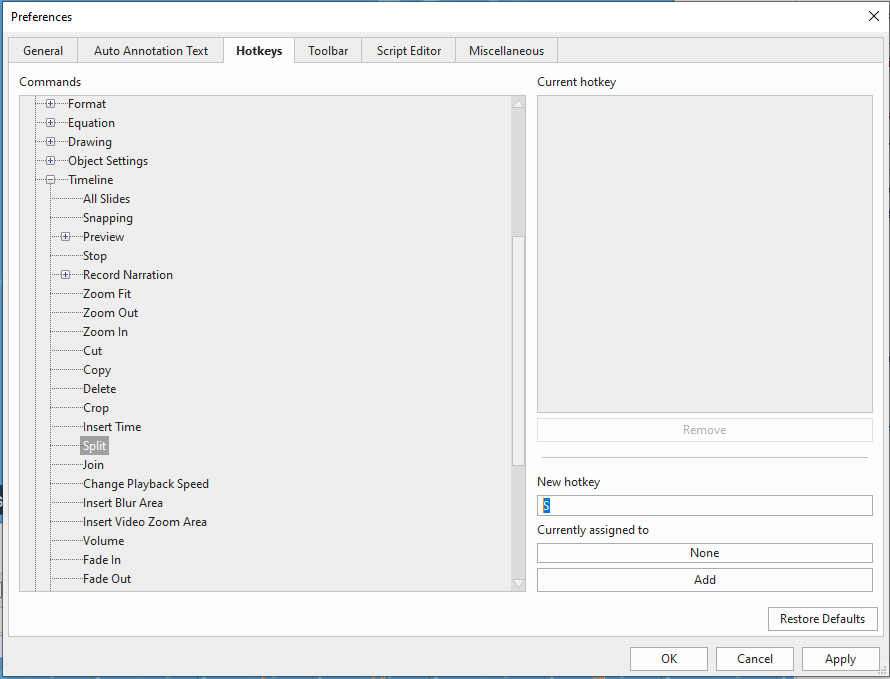
In ActivePresenter, you can set up hotkeys to achieve that.
Just click the ActivePresenter button > Preferences > Hotkeys.

Kindly take a look at this article for more details: How to Customize Hotkeys in ActivePresenter 9

BR,

Yes, you’re correct. Apologies, I’m super new to this and haven’t seen the hot key feature yet. But it looks like this method is better than strictly assigned hot keys. Question answered.