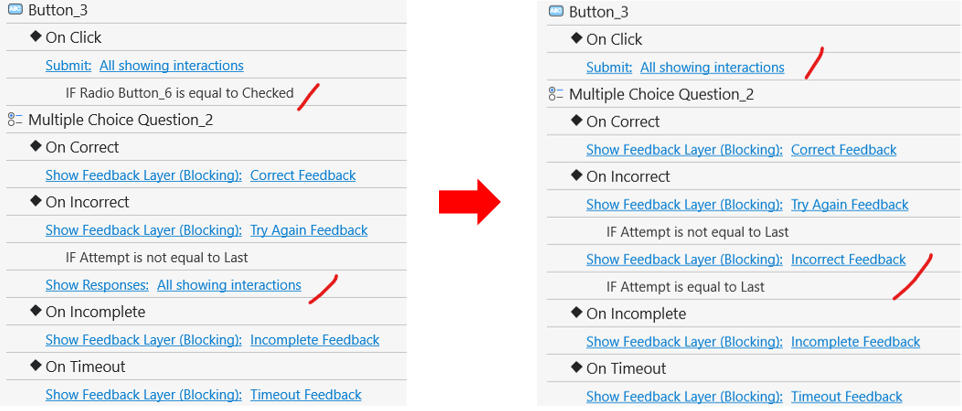
Hi and thank you Hang for your reply. Here is what I am trying to accomplish:
Incorrect answer → Submit → feedback: Incorrect, try again
Correct answer → Submit → feedback: Correct!
Button for “Next” slide
I think I understand how to do #3 - create the Next button.
Its the other ones 1 & 2 that don’t seem to be working.
That is all. I am not fully understanding the action terminology.
I believe that is why I am not getting it.
Once I feel confident in these, my next step will be to implement variables into the math questions, so the numbers are randomized: 0 x 0 → 12 x 12 and everything in between. Is that possible?
Please find the fixed project attached below for your reference. randomMath.approj (588 KB)
Kindly update to version 10 to use the math feature, so rounding the numbers is no longer required.
To create this project, please follow these steps:
Create the required number variables.
Add the JavaScript code to the project’s On Load event
(File > Project > Properties > Interactivity tab > On Load > Execute JavaScript).
Call the function in each slide’s On Load event.
Enable Shuffle Answers for the question.
For the Correct/Incorrect Feedback, the actions should remain at their default settings, as that’s what you intended.
For Submit, don’t set the condition based on which option is checked. If you do, the question will only be submitted when that specific option is checked.