Hello ActivePresenter team and everyone!
Thanks to the ActivePresenter team for developing this tool, which provides several important features for eLearning editors.
Please consider the following suggestions for your next major release. The development team could enhance ActivePresenter further and make it more user-friendly.
Quick Features Mode
Develop a Quick/Standard Features Mode that provides more flexibility for users, especially when using ActivePresenter as an authoring tool for content that will be uploaded to an LMS for schools, universities, workplaces, and similar environments.
The Advanced Features Mode could remain as it currently appears in the right panel of ActivePresenter. Switching to the Quick/Standard Features Mode would provide faster access to commonly used settings for quiz slides, result slides, and other frequently used components.
For example, when working on common slides such as question or report slides, the most common and popular settings could appear contextually. This would prevent editors from having to search through multiple options in the right panel.
Suggested quick-access options include:
For Question Slides:
-
Feedback
-
Score
-
Attempts
-
Shuffle answers
-
Timing
-
Partial scoring
-
Case-sensitive answers
-
Etc.
For Report Slides:
-
Show user score
-
Show passing score
-
Enable/disable Review button
-
Retry button
-
Print results
-
Quiz attempts
-
Slide feedback (Passed/Failed)
-
Etc.
Make Question Settings Effects More Visible (WYSIWYG Approach)
Currently, when users are on a question slide and click Format → Question Settings, there is little or no visible indication of what changes were applied or what action should be taken next.
Consider implementing a message bubble, tooltip, or popup that guides the user after changing a setting. It would also be helpful if the effect of the selected option could be previewed directly on the slide following a WYSIWYG (What You See Is What You Get) approach.
Multiple Choice Conversion to Multiple Response
Provide a feature that allows users to quickly convert a Multiple Choice question into a Multiple Response question type.
Multiple Choice/Response – Answer Deletion
The plus (+) button for adding answers is very useful. It would also be helpful to include a delete (x) button that allows users to quickly remove answer lines.
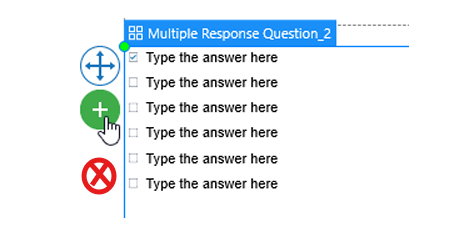
This could apply to all relevant question types, including:
-
Multiple Choice
-
Multiple Response
-
Sequence
-
Fill in the Blanks
-
Other similar question slides
-
Etc.
Press Enter to Create a New Response Line
Currently, for some question types, users must click the plus (+) button to add a new response line.
It would improve usability if pressing the Enter key could automatically generate a new empty response line.
Add a “Select from List” Question Type
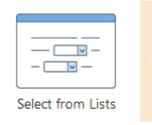
Please consider adding a “Select from List” question type.
This feature would be very useful and practical, as learners could open a dropdown list and select the correct answer directly from the available options.
Rename “Equation” to “Mathematics”
Currently, when users want to write fractions or other mathematical expressions, they must click on the Equation button, which also contains many other mathematical structures and symbols.
Since the feature includes broader mathematical tools, it may be more intuitive to rename it to Mathematics.
It would also be useful to display common mathematical structures directly as buttons within the dropdown list for faster access.
Timer Issue in Essay Questions
Currently, the timer does not work properly when used with Essay question slides.
Each time the user presses the Enter key while typing in a timed essay slide, a feedback popup appears, preventing continued access to the essay field.
This behavior interrupts the writing process and should be improved.
Thank you for considering!