Drag and Drop – Source does not resize to fill Target

Hi ActivePresenter Team,
I created a drag-and-drop question in ActivePresenter. I set different sizes for the source and the target objects. What I want is that when I drag the source and drop it onto the target, the source image should automatically resize to fully fill the target area.

I’ve checked the Snap settings, but I couldn’t find any option for this behavior. Is there a way to make the dropped source scale to the target size? If possible, could you please show me a simple example of how to achieve this?
Thanks in advance!

Good morning Burhan,

I’ve attached the project for your reference.
In this project, JavaScript is used in the On Load event:

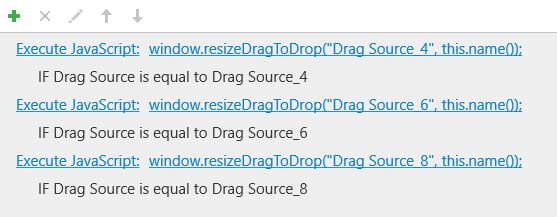
window.resizeDragToDrop = function(dragName, dropName) {
  var dragObj = prez.object(dragName);
  var dropObj = prez.object(dropName);

  if (dragObj && dropObj) {
    dragObj.size(dropObj.width(), dropObj.height());
    dragObj.location(dropObj.left(), dropObj.top());
  }
};

Then, create an advance action:


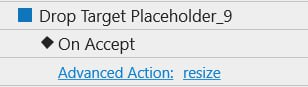
And, add the advance action to each drop target’s on Accept event:
image

resize.approj (908 KB)

Regards,

1 Like

Good morning Hang,

Thank you so much for your help.

Hi Hang,
When the student completes the question and switches to review mode, how can I preserve this resize effect? Is there a way to do that?

Hi Burhan,

This isn’t available right now, unfortunately. Instead, you can set the objects to the same size.

Regards,

Hi Hang,

Understood. In that case, how can I revert the source objects to their previous size and position within onReject?

Hi,

I just mean you’ll want to use objects of the same size when editing in the Canvas :smiley: