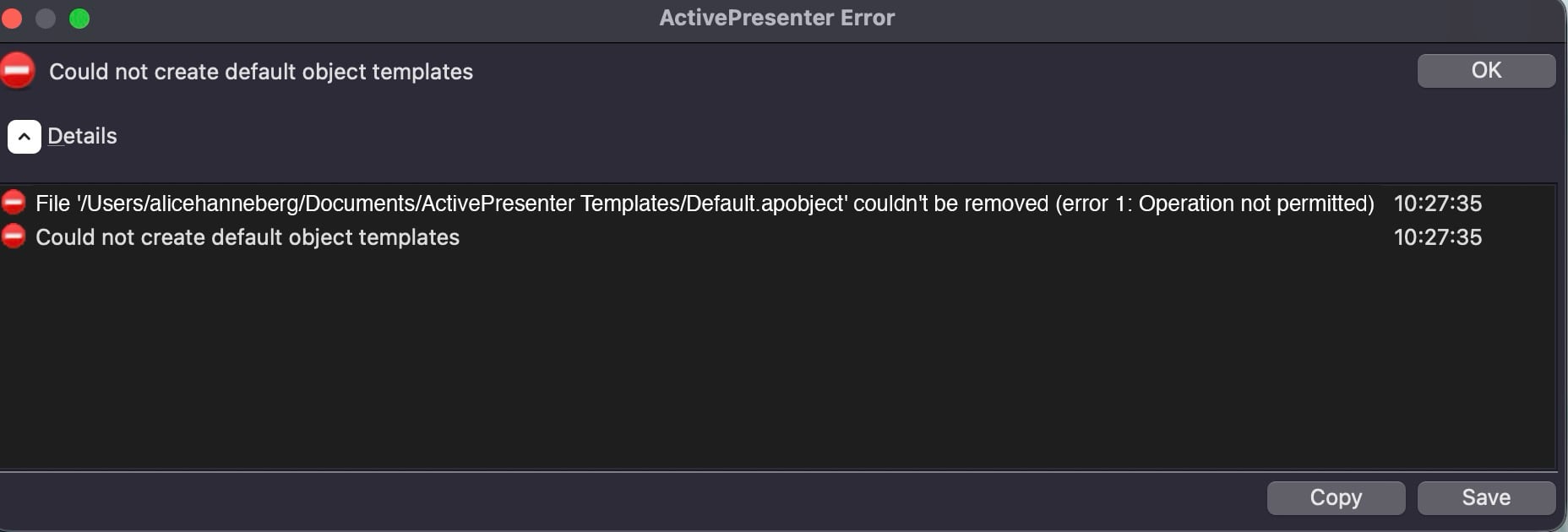
couldn’t be removed (error 1: Operation not permitted)
This most likely indicates a macOS file permission or privacy issue rather than a problem with the project itself. ActivePresenter is attempting to update the Default.apobject file when starting or opening a project, but macOS is preventing the existing file from being removed.
Please try the following:
Quit ActivePresenter.
In Finder, go to: ~/Documents/ActivePresenter Templates/
Locate Default.apobject and rename or delete it.
Reopen ActivePresenter. The application should recreate the file automatically.
If Finder also cannot delete the file, please check:
System Settings > Privacy & Security > Files and Folders and make sure ActivePresenter is allowed to access your Documents folder.
System Settings > Privacy & Security > Full Disk Access and try enabling ActivePresenter.
In Finder, right-click Default.apobject and the ActivePresenter Templates folder > Get Info, then make sure they are not locked and that your account has Read & Write permission.
If the issue persists, please let us know whether your Documents folder is synchronized with iCloud or another cloud storage service, as this can sometimes cause file access conflicts.
Dear Hoa,
I just wanted to take a moment to sincerely thank you for your quick and incredibly helpful support. My question was handled in a detailed, clear, and efficient way, and I truly appreciate the effort you put into resolving it so promptly.
It’s rare to receive such responsive and well-explained assistance, and it made my experience with ActivePresenter even better. Your professionalism and dedication really stand out.
Thank you again for your excellent support and for making the process so smooth!
Best regards,