I am using ActivePresenter latest version and I have a critical issue with slide navigation that affects an entire e-learning course.
Clicking anywhere on a slide (outside any object) advances to the next slide. This bypasses all custom conditional navigation I have built — students can skip activities and progress requirements simply by clicking on the slide background.
What I have already checked and confirmed:
“Slide Switcher” (Przełącznik slajdu) is unchecked in slide properties for all slides.
There are no transparent overlay objects covering the slide background.
All “On Click” actions are assigned to specific named objects only — nothing is assigned to the slide itself.
The behavior persists in exported SCORM/HTML output — it is not only a preview issue.
The course uses programmed conditional navigation — students must complete specific activities before they are allowed to advance. Click-anywhere completely bypasses this logic. All modules of the course are affected. This is a production-ready project and we need an urgent solution.
Please provide either a way to completely disable click-anywhere-to-advance at project level, or confirm this is a bug and provide a fix or workaround.
Additionally, if you are importing slides from PowerPoint, you can prevent this behavior in future imports by going to the Preferences dialog > Miscellaneous tab and enabling the Import PowerPoint animations to the main timeline option.
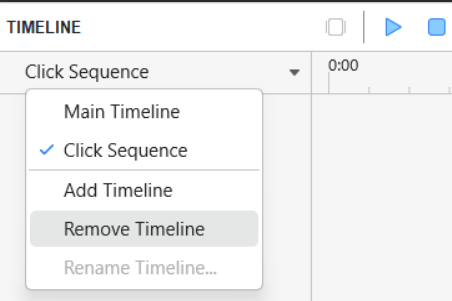
Please note that this setting only applies to future PowerPoint imports. For your current project, you will still need to remove the existing Sequence Timelines manually.
Please let us know if you need any further assistance.
I was convinced that clearing the click sequence and switching to the main timeline would be sufficient. Imagine - I have to switch to the click sequence (so it gets the checkmark) and only then remove it. The fear of breaking something is quite significant.
I’m experiencing an issue where clicking anywhere on a slide background advances to the next slide, even though I have disabled all relevant options:
Transitions: “Switch slide” is turned off for all slides
No Click Sequence Timeline present on any slide (no animations were imported)
No action objects on the slide background
The project was imported from PowerPoint
In Preferences, “Import PowerPoint animations to the main timeline” is enabled
The slide has only audio (Text2Speech) on the Main Timeline. There are no interactive objects, no timings, no transitions set. Despite all of this, clicking anywhere on the slide during preview/export advances to the next slide immediately - even while the audio is still playing.
Could you please send the affected ActivePresenter project file and the original PowerPoint file to support@atomisystems.com so we can investigate the issue?