I would like to report a bug found in the newly released ActivePresenter 10.0.
Steps to Reproduce:
Create a new project.
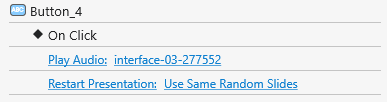
Insert a button into a slide.
Add a Click event with the action Play Audio.
Set the Blocking option to Off.
Add another event to the same button, such as:
Restart Presentation
Review Presentation
Go To Slide
Go To Slide at Index
Go Forward
Go Backward
Expected Result:
The audio should play when clicking the button, regardless of whether these navigation actions are also triggered.
Actual Result:
The audio does not play at all when the blocking option is disabled and combined with any of the navigation actions listed above.
It only plays if Blocking is enabled.
Could you please confirm if this is a bug and let us know if a fix is planned?
This is not a bug, Burhan.
Let me give you a detailed explanation.
When the Blocking option is selected (enabled), actions will occur in order. It blocks subsequent actions until the current action completes.
So, in this case, the audio plays > ends > other actions are triggered.
Conversely, when the Blocking option is deselected (disabled), actions will occur at the same time.
The audio plays and ends immediately because the slide is restarted in your case.
Hello,
I always keep the blocking option disabled. There was no such issue in version 9.3.0. Now this problem occurs in the new version.
This is very important as well. Could you please test it? Try disabling the blocking option — you’ll see that the sound does not play. However, in version 9.3.0, even when blocking was disabled, the sound still played correctly, but now it doesn’t.
Everything works the same in our side. We’ve tested on both version 9.3.0 and version 10. It works the same as what I explained in the previous post.
So, it would be helpful if you could share a video illustrating the differences between version 9.3.0 and version 10.
Thank you very much for your support and help.
I’m sending you a sample project. I’m working with this scenario, but unfortunately, the sound does not play.
Please find the demo project attached.
I’m attaching another sample project. The issue is related to Restart Presentation. Once you restart the presentation, the sound will never play again in the project.
So, the problem seems specific to version 10.0 and occurs especially after using Restart Presentation.
Hello ActivePresenter team,
Will there be an update to fix the issue that is very clearly visible in the latest example I shared, or will we have to revert back to version 9.3.0?
Thank you for sending the project with a clear description.
The audio can’t play only happens with short audio, and it’s not related to the Restart Presentation action.
Our development team is already investigating the issue.
We’ll respond to you later.
Our development team has confirmed the bug will be fixed in the next update. However, we don’t have an exact release date to share just yet.
In the meantime, you can try one of the following workarounds to continue working on your project:
Add a Execute JavaScript action: prez.pauseAll(false); right after the Restart Presentation action.
Extend your audio duration: Add a short silent segment after the audio so that the total duration is around 10 seconds. This will prevent the issue from occurring.
These temporary solutions should help you deliver your project while we prepare the official fix.
I’m having the same issue. The temporary fix didn’t work for me either. Extending the sound durations also messes up the flow of the program. I’m working on an interface for a fun kids’ game, and it uses a lot of sound effects. Really looking forward to the next update! Thanks for your hard work — you’re an awesome team.