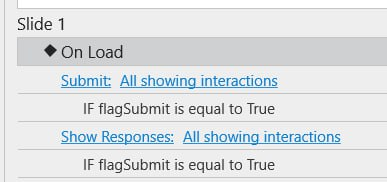
In my project, I have 3 slides. Each slide contains a Fill-in-the-Blank text entry question.
I allow the learner to skip the first two questions and go directly to the 3rd slide to submit.
Expected Result:
When the learner clicks Submit on the last slide, I expect the system to record that the first two questions were left blank.
Actual Result:
When I check using Show Responses → All showing interactions, I only see the response for the 3rd question. The first two questions show no information at all, as if they don’t exist.
This problem happens only with Fill in Text Entries questions. For other question types, even if skipped or left blank, responses are correctly recorded as unanswered.
Debug Info (from Developer Console):
rlplayer.js:101 Uncaught TypeError: Cannot read properties of undefined (reading 'toLowerCase')
    at i.re (rlplayer.js:101:210198)
    at i.re (rlplayer.js:101:156798)
    at we (rlplayer.js:101:31653)
    at a (rlplayer.js:101:118520)
    at i.<anonymous> (rlplayer.js:101:118536)
    at i.r (rlplayer.js:101:150008)
    at i.dispatch (rlplayer.js:30:39053)
    at m.handle (rlplayer.js:30:37048)
    at Object.trigger (rlplayer.js:30:67506)
    at w.fn.init.triggerHandler (rlplayer.js:30:68185)
Analysis:
The error happens because in rlplayer.js , the code calls .toLowerCase() on a response that is undefined .
Normally, unanswered questions should be recorded as "" (empty) or "unanswered" .
But for Fill in Text Entries , if the learner skips the question without any interaction, the response variable stays undefined .
When the player executes undefined.toLowerCase() , it throws the error above.
Could you please review and fix so that skipped Fill in Text Entries questions are also recorded as unanswered (blank), just like other question types?
The questions on slides 1 and 2 haven’t been submitted yet, so that’s why no response shows up. The Submit button on slide 3 only works for the interactions on that slide (the question there), not for the whole presentation.
To fix this, just add a Submit action to the Next buttons, so when you move to the next slide, the question on that slide will also be submitted.
The Show Response on slide 3 is set to display only for that slide. If you also want it to appear on slides 1 and 2, add a Show Response action to the On Load event of those slides. That way, when you go back, you’ll see the responses showing up too.