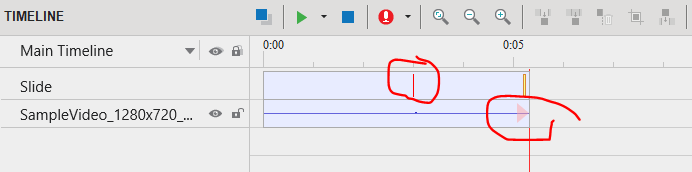
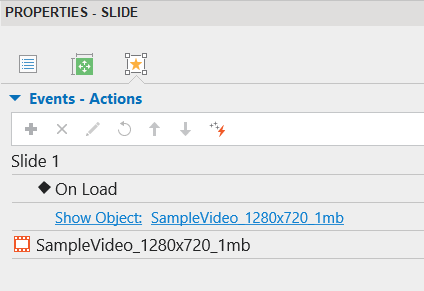
In ActivePresenter, I added a new slide and inserted a video intended to play in a loop. Both Autoplay and Loop options are enabled, but the video plays only once instead of repeating.
Additionally, after the video finishes playing, the video area disappears — there is no static thumbnail or frame remaining on the slide.
Steps to Reproduce:
Create a new project in ActivePresenter.
Add a new slide.
Insert a video into the slide.
Enable Autoplay and Loop for the video.
Preview or export the project.
Expected Result:
The video should continuously loop as long as the slide is displayed.
If the video stops, its last frame or a thumbnail should remain visible in its position.
Actual Result:
The video plays only once and does not loop.
After playback ends, the video area disappears entirely from the slide.
The video duration is currently longer than the slide duration, so it will play until the end of the video.
At that point, an exit effect is applied, which makes the video disappear when it finishes.
If you want the video to loop, extend the slide duration so that it is longer than the video duration. To do this, drag the red vertical line to the right.
Next, remove the video’s exit effect by right-clicking it and selecting Play to the End of Slide. This way, the video will keep looping until the slide ends, and it will not disappear.
Thank you very much for your detailed explanation and guidance — it was very helpful.
Just as feedback: when a user enables the Loop option, my expectation is that the video would keep repeating continuously regardless of the slide duration, or alternatively allow specifying the number of repetitions.
Perhaps this could be considered as an improvement in future versions, as it would make the loop feature more intuitive and convenient.