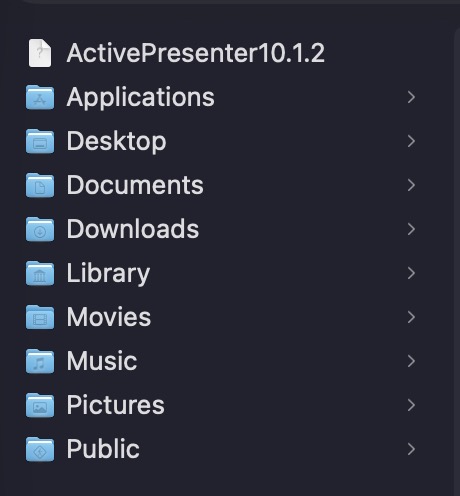
We are experiencing a recurring issue with ActivePresenter on macOS.
Occasionally, a file named “ActivePresenter10.1.2” is created in the user’s home directory (see attached screenshot). When this file exists, ActivePresenter fails to launch. The application only starts successfully after the file is manually deleted.
Could you please clarify:
Is this a known issue on macOS?
What is the purpose of this file, and why is it created in the user’s home directory?
Is there a permanent fix or workaround to prevent ActivePresenter from becoming unable to start?
We would appreciate any guidance on resolving this issue, as it appears repeatedly on our systems.
ActivePresenter creates the ActivePresenter[Version] file in the user folder to ensure that only one instance of the application is running at a time. Normally, this file is removed automatically when the application exits properly.
If it crashes or is terminated unexpectedly, the file may remain there and prevent the application from launching again.
Since this happens frequently on your machine, it may indicate that ActivePresenter is repeatedly encountering an unexpected issue when closing. Please update to version 10.5.0 and check whether the issue still occurs.
We will also improve this behavior in the upcoming 10.5.1 release.
I have upgraded to the latest version (10.5.0) and I am currently testing it to see if the issue still occurs. I will keep you updated with my findings.
Thanks again for your support and for the quick response.