Hmm… There are some controls for manipulation of the timeline but if your YouTube video runs independent of the timeline - I would not expect them to work.
Nonetheless, you could try them and see.
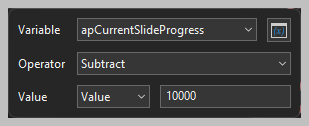
On a given slide - you can adjust the system variable apCurrentSlideProgress
This value is in milliseconds so if you wish to go back 10 seconds - you would use the value of 10000.
You might try creating an onClick event for a button and choose adjust variable.
Then you could do a subtract 10000
Note that setting this variable does not change the state of the video.
If you go back while the slide is still playing - the slide will keep going.
If you go back after the slide has stopped - you’ll go back 10 seconds but be in a paused state.
For a YouTube video that runs independently, you can try the code found in this thread and adjust the values as needed for your project.